using (SPWeb web =SPContext.Current.Site.OpenWeb())
{
SPList Projectimages = web.Lists["ProjectPictures"];
SPQuery myQuery = new SPQuery();
SPListItemCollection Items = Projectimages.GetItems(myQuery)
}
If we use Using(){} it will automatically dispose all objects.
We need to declare and use all SPObjects in Using clause
Showing posts with label Sharepoint 2010. Show all posts
Showing posts with label Sharepoint 2010. Show all posts
Wednesday, December 22, 2010

Sunday, September 26, 2010
Master Pages in SharePoint 2010
SharePoint 2010 brings a few new master pages that you may want to know about. There are additional master pages to accommodate both the old and new versions of UI. There are also some simplified pages to take note in.
The first master page we will talk about is v4.master. This is the default team site master page used with version 4 (obviously) of the UI. This will be the master page you typically use. It provides the ribbon bar and all of the other new visual UI changes such as the site actions menu on the left side.
If you did an upgrade to SharePoint 2010 and haven’t transitioned to the new UI yet, the old master page is still in default.master. This looks just like the master page you use in SharePoint v3 today. It doesn’t have the ribbon bar and the site actions menu is still on the right side.
The search pages by default now use minimal.master. This is a really slimmed down master page with next to nothing on it. It doesn’t even have navigation. I’m not sure why they opted to use this page in Search Center, but I think it provides and issue with people trying to leave the search center. The Office Web Applications also use this master page but that makes a little more sense because it provides more screen real estate.
The last page I will mention is simple.master. This page is used for login and error pages. From what I understand, it can’t be customized (I have no idea why), but it can be replaced.
I hope this helps if you were curious about the new master pages. I’ll also remind you again that application pages can also now make use of any branded master pages you might have created. I’ll also point out that the master pages all use properly formed XHTML although I am not sure about default.master. I will check that when I get a chance.
The first master page we will talk about is v4.master. This is the default team site master page used with version 4 (obviously) of the UI. This will be the master page you typically use. It provides the ribbon bar and all of the other new visual UI changes such as the site actions menu on the left side.
If you did an upgrade to SharePoint 2010 and haven’t transitioned to the new UI yet, the old master page is still in default.master. This looks just like the master page you use in SharePoint v3 today. It doesn’t have the ribbon bar and the site actions menu is still on the right side.
The search pages by default now use minimal.master. This is a really slimmed down master page with next to nothing on it. It doesn’t even have navigation. I’m not sure why they opted to use this page in Search Center, but I think it provides and issue with people trying to leave the search center. The Office Web Applications also use this master page but that makes a little more sense because it provides more screen real estate.
The last page I will mention is simple.master. This page is used for login and error pages. From what I understand, it can’t be customized (I have no idea why), but it can be replaced.
I hope this helps if you were curious about the new master pages. I’ll also remind you again that application pages can also now make use of any branded master pages you might have created. I’ll also point out that the master pages all use properly formed XHTML although I am not sure about default.master. I will check that when I get a chance.
Tuesday, September 21, 2010
Difference between sharepoint foundation and sharepoint server
Regarding “SharePoint Foundation” and “SharePoint Server 2010”, the important thing to understand is that SharePoint Foundation is the foundation, and SharePoint Server is simply an optional add-on package of more advanced features. In fact, you cannot install SharePoint Server by itself, because installing it automatically also installs SharePoint Foundation.
So the question is:
What differs between SharePoint Foundation and SharePoint Server?
What version do you need?
The answer depends on your requirements, and not so much on the size of your organization. For example, if you want a good platform for a basic intranet plus collaboration and project management, then SharePoint Foundation may be just what you need. If you need the best web content management, more advanced document management, or tight integration with Excel, Access, and Visio, then SharePoint Server is what you need.
SharePoint Foundation
Here are some of the more frequently used features and characteristics of SharePoint Foundation:
It’s a web based application running on top of Internet Information Services (IIS)
It’s a free 64 bit only add-on to any edition of Microsoft Windows 2008 Server or
Windows 2008 R2
It requires a 64 bit Windows Server operating system
It stores all its data and information in one or more Microsoft SQL Server databases
It displays information using a web page file, usually containing one or more web parts
It has very good document management features, such as version history, custom metadata, and Microsoft Office integration
It has a number of list types that you can use for storing different types of information, such as documents, contacts and calendar items
It enables you to build workflow solutions; for example, sending an email to a given user
When a document is changed or a list column is set to a specific value
It’s perfect for building basic, but effective, intranet solutions, with its built-in web content management features
It’s ideal for collaboration on project data, meetings, social events, blogs, and such
But there are also important features that SharePoint Foundation does not offer. Here are just a few examples:
No built-in advanced search functionality. SharePoint Foundation offers limited search
functionality, but still it will only allow users to search within the current site and sites below it
No advanced web content management features, such as publishing control, targeted
information, and multilingual support
No advanced document management features, such as global document IDs, document sets, and document policies
No record management of legal and other important documents
No support for displaying InfoPath forms in a web browser
No support for displaying MS Excel spreadsheets as web parts
No support for displaying MS Visio 2010 diagrams as a web part
No support for key performance indicators (KPIs)
This is where SharePoint Server 2010 comes in.
SharePoint Server 2010
SharePoint Server 2010 uses the same types of web sites and features as SharePoint Foundation but adds a lot of functionality. In addition to the previous list, SharePoint Server 2010 also provides the following features:
Use the global search functionality to find any type of information, regardless of type and location, based on content or metadata properties
Use Social Search to find people based on their typical activities and interests
Target displayed information to one or more user groups
Import user properties from AD, and make them searchable
Use advanced content management features for public Internet sites or portal intranet sites
Allow globally unique document IDs and document sets
Display and use InfoPath forms with a web client, using the Forms Service
Display Microsoft Excel spreadsheets and charts in a web part, using Excel Services
Display Microsoft Visio 2010 diagrams directly on a web page, using the Visio web part
Search, display, and edit content in external databases, such as SAP, Oracle, and Microsoft SQL, using the Business Connectivity Service
Give each SharePoint user a personal website, for both private and public use
Create dashboards with scorecards and key performance indicators
Currently rated 5.0 by 1 people
So the question is:
What differs between SharePoint Foundation and SharePoint Server?
What version do you need?
The answer depends on your requirements, and not so much on the size of your organization. For example, if you want a good platform for a basic intranet plus collaboration and project management, then SharePoint Foundation may be just what you need. If you need the best web content management, more advanced document management, or tight integration with Excel, Access, and Visio, then SharePoint Server is what you need.
SharePoint Foundation
Here are some of the more frequently used features and characteristics of SharePoint Foundation:
It’s a web based application running on top of Internet Information Services (IIS)
It’s a free 64 bit only add-on to any edition of Microsoft Windows 2008 Server or
Windows 2008 R2
It requires a 64 bit Windows Server operating system
It stores all its data and information in one or more Microsoft SQL Server databases
It displays information using a web page file, usually containing one or more web parts
It has very good document management features, such as version history, custom metadata, and Microsoft Office integration
It has a number of list types that you can use for storing different types of information, such as documents, contacts and calendar items
It enables you to build workflow solutions; for example, sending an email to a given user
When a document is changed or a list column is set to a specific value
It’s perfect for building basic, but effective, intranet solutions, with its built-in web content management features
It’s ideal for collaboration on project data, meetings, social events, blogs, and such
But there are also important features that SharePoint Foundation does not offer. Here are just a few examples:
No built-in advanced search functionality. SharePoint Foundation offers limited search
functionality, but still it will only allow users to search within the current site and sites below it
No advanced web content management features, such as publishing control, targeted
information, and multilingual support
No advanced document management features, such as global document IDs, document sets, and document policies
No record management of legal and other important documents
No support for displaying InfoPath forms in a web browser
No support for displaying MS Excel spreadsheets as web parts
No support for displaying MS Visio 2010 diagrams as a web part
No support for key performance indicators (KPIs)
This is where SharePoint Server 2010 comes in.
SharePoint Server 2010
SharePoint Server 2010 uses the same types of web sites and features as SharePoint Foundation but adds a lot of functionality. In addition to the previous list, SharePoint Server 2010 also provides the following features:
Use the global search functionality to find any type of information, regardless of type and location, based on content or metadata properties
Use Social Search to find people based on their typical activities and interests
Target displayed information to one or more user groups
Import user properties from AD, and make them searchable
Use advanced content management features for public Internet sites or portal intranet sites
Allow globally unique document IDs and document sets
Display and use InfoPath forms with a web client, using the Forms Service
Display Microsoft Excel spreadsheets and charts in a web part, using Excel Services
Display Microsoft Visio 2010 diagrams directly on a web page, using the Visio web part
Search, display, and edit content in external databases, such as SAP, Oracle, and Microsoft SQL, using the Business Connectivity Service
Give each SharePoint user a personal website, for both private and public use
Create dashboards with scorecards and key performance indicators
Currently rated 5.0 by 1 people
Friday, August 13, 2010
Changing i like it ,change notes butoon to small icons in sharepoint 2010 ribbon
To convert the large social buttons to smaller ones you simply have to modify the following:
Within your custom Master Page search for: “GlobalSiteLink3”
Simply Add “-mini” to the control ID
Original Large Control:

New Small Control ID:

If you want to make the small buttons horizontal versus vertical simply add the following to your custom CSS:
.ms-mini-socialNotif-Container{
white-space: nowrap;
}

Within your custom Master Page search for: “GlobalSiteLink3”
Simply Add “-mini” to the control ID
Original Large Control:
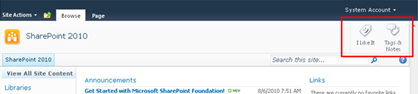
New Small Control ID:

If you want to make the small buttons horizontal versus vertical simply add the following to your custom CSS:
.ms-mini-socialNotif-Container{
white-space: nowrap;
}

Monday, August 9, 2010
Column Validation in SharePoint 2010
The ability to easily validate the column values entered into list items is a welcome addition to SharePoint 2010. I'd like to walk thru 2 simple example s of how to use column validation, at the column level, then at the list level. I'll then point out some specific notes about this feature.
Simple Example #1 - Column Level
Create a new column on a list, and click "Column Validation":

2.Add a validation Formula, and a message that will display if validation fails:

3.Create a new item, and enter a value that will not validate. Click OK. You will see your failure message:

Simple Example #2 - List Level
In the List Settings, click on "Validation Settings"

Enter a validation formula to apply to this list. Click Save.

Create a new list item, entering in values that will not validate. Click OK. The item does not save, but the User Message doesn't appear either. I assume this is a bug, and it ought to be fixed before RTM.

Field Types
In this simple example we used a "Single Line of Text" field type. The following field types can be validated with the "Column Validation" feature:
Single Line of Text
Choice (single only)
Number
Currency
Date & Time
Formulas
You can only compare column values to one another in a list level validation.
A validation formula at the column level cannot include any other columns besides itself. For example, [Column1]>[Column2] is an invalid formula and SharePoint will not allow it to be used at the column level. In this case, you want to use list-level validation.
There is only one formula available at the list level.
The formula syntax is similar to that used in Calculated Columns
There are a few dozen functions available - I have not tried every one. One interesting thing to note is that SharePoint 2010 would not allow me to use the TODAY function, even when validating a Date field. [DateColumn]>TODAY is not a valid validation formula.
Conflicts
What if you have both column level validation and list level validation?
The column level formulas will be evaluated first, then the list formulas
What if the column and list level validations are in conflict?
Example - at the list level, you require that [Text1] = [Text2], but each column has it's own validation; [Text1]="AAA", and [Text2]="BBB". In this case, it will be impossible to actually submit a list item. The column validations are evaluated first, but if the values validate here, they will of course fail the list validation.
What if the list level validation includes columns not included in a particular content type?
If a column used in the list formula isn't available in the current content type, validation will always fail. This means that if you have multiple content types in your list, you should not validate at the list level for a column that is not included in all content types on the list. These columns can only be validated at the column level.
Site Columns
You can set validation on custom columns of the field types listed above
You can override the validation of a site column at the list level
Items To Investigate
How does validation behave with page fields in a Pages library on a publishing site?
How does validation behave in Office client applications?
Is validation available in the Site Directory? Does it work at site creation time?
Can we use regular expressions in a validation formula?
Simple Example #1 - Column Level
Create a new column on a list, and click "Column Validation":

2.Add a validation Formula, and a message that will display if validation fails:

3.Create a new item, and enter a value that will not validate. Click OK. You will see your failure message:

Simple Example #2 - List Level
In the List Settings, click on "Validation Settings"

Enter a validation formula to apply to this list. Click Save.

Create a new list item, entering in values that will not validate. Click OK. The item does not save, but the User Message doesn't appear either. I assume this is a bug, and it ought to be fixed before RTM.

Field Types
In this simple example we used a "Single Line of Text" field type. The following field types can be validated with the "Column Validation" feature:
Single Line of Text
Choice (single only)
Number
Currency
Date & Time
Formulas
You can only compare column values to one another in a list level validation.
A validation formula at the column level cannot include any other columns besides itself. For example, [Column1]>[Column2] is an invalid formula and SharePoint will not allow it to be used at the column level. In this case, you want to use list-level validation.
There is only one formula available at the list level.
The formula syntax is similar to that used in Calculated Columns
There are a few dozen functions available - I have not tried every one. One interesting thing to note is that SharePoint 2010 would not allow me to use the TODAY function, even when validating a Date field. [DateColumn]>TODAY is not a valid validation formula.
Conflicts
What if you have both column level validation and list level validation?
The column level formulas will be evaluated first, then the list formulas
What if the column and list level validations are in conflict?
Example - at the list level, you require that [Text1] = [Text2], but each column has it's own validation; [Text1]="AAA", and [Text2]="BBB". In this case, it will be impossible to actually submit a list item. The column validations are evaluated first, but if the values validate here, they will of course fail the list validation.
What if the list level validation includes columns not included in a particular content type?
If a column used in the list formula isn't available in the current content type, validation will always fail. This means that if you have multiple content types in your list, you should not validate at the list level for a column that is not included in all content types on the list. These columns can only be validated at the column level.
Site Columns
You can set validation on custom columns of the field types listed above
You can override the validation of a site column at the list level
Items To Investigate
How does validation behave with page fields in a Pages library on a publishing site?
How does validation behave in Office client applications?
Is validation available in the Site Directory? Does it work at site creation time?
Can we use regular expressions in a validation formula?
Cascading Drop-Down List in SharePoint 2010 using InfoPath 2010
Cascading drop-down is a common business requirement. SharePoint 2007 does not support cascading drop-down list by default. User have to write custom SharePoint field and it’s not easy to implement. With SharePoint 2010, User able to customize SharePoint form in easy way by using the powerful of InfoPath Designer. Following is the step guides to create a cascading drop-down list solution in SharePoint 2010 without require a lot of IT knowledge.
Scenario: We build a cascading for Address List. We have three list: City, District and Ward
1. Create City List
- In SharePoint 2010, create a custom List and named as “City”
- Add Two Item to this list: Hanoi and TP HCM
2. Create District List
- In SharePoint 2010, create a custom List and named as “District”
- Create a Lookup column named as “City”. This column get information from City List in the column Title.
- Add 4 items to District list

3. Create Ward List
- In SharePoint 2010, create a custom List and named as “Ward”.
- Create a Lookup column named as “City”. This column get information from City List in the column Title.
- Create a Lookup column named as “District”. This column get information from District List in the column Title.
- Create on Add new Item link you will see. When we choose City, District still have 4 item.

4. Customize Ward form to meet cascading requirement
- In Ward List, click on Customize Form ribbon button

- System will automatically open the form template of Ward list in InfoPath Designer

- Right click on District drop-down list control then select Drop-Down List box Properties from menu to open the properties windows

- In Data Source. Click on Add button
- In Data Connection Wizard, click on Next button

- In Select the source of your data, choose SharePoint library of list then click Next button

- In SharePoint Site details screen, click on Next button

In Select a list of library, choose District the click on Next button

In select fields: Choose Title, City, ID then click on Next button

In next screen, choose Next button

- Leave the default name for the connection as “District1” then click Finish button

Now, You will see the Data Source of Drop-Down list box is District1

- In Entries section, click on the tree button to select XPath
- In Select a Field or Group dialog, click on Filter Data… button

- In Filter Data click on Add… button

- In specify Filter Conditions, in the first drop-down list choose Select a field or group

Select a Field or Group opened. Select District1 as Data Source, choose City in dataFields then click OK

In specify Filter Conditions, in the last drop-down list choose Select a field or group

Select a Field or Group opened. Select Main as Data Source then choose City in dataFields then click OK

Click on OK to close specify Filter Conditions dialog
- Click on OK to close Filter Data dialog
- Click on OK to close Select a Field or Group
- In Drop Down List box properties, choose d:ID in Value: section then click OK to close this

- In InfoPath Designer, close the Windows then choose the Save and Publish button

- After Publishing complete, back to Ward list then click on Add new item link. You will see the result


Two drop-down list has been cascading.
Scenario: We build a cascading for Address List. We have three list: City, District and Ward
1. Create City List
- In SharePoint 2010, create a custom List and named as “City”
- Add Two Item to this list: Hanoi and TP HCM
2. Create District List
- In SharePoint 2010, create a custom List and named as “District”
- Create a Lookup column named as “City”. This column get information from City List in the column Title.
- Add 4 items to District list

3. Create Ward List
- In SharePoint 2010, create a custom List and named as “Ward”.
- Create a Lookup column named as “City”. This column get information from City List in the column Title.
- Create a Lookup column named as “District”. This column get information from District List in the column Title.
- Create on Add new Item link you will see. When we choose City, District still have 4 item.

4. Customize Ward form to meet cascading requirement
- In Ward List, click on Customize Form ribbon button

- System will automatically open the form template of Ward list in InfoPath Designer

- Right click on District drop-down list control then select Drop-Down List box Properties from menu to open the properties windows

- In Data Source. Click on Add button
- In Data Connection Wizard, click on Next button

- In Select the source of your data, choose SharePoint library of list then click Next button

- In SharePoint Site details screen, click on Next button

In Select a list of library, choose District the click on Next button

In select fields: Choose Title, City, ID then click on Next button

In next screen, choose Next button

- Leave the default name for the connection as “District1” then click Finish button

Now, You will see the Data Source of Drop-Down list box is District1

- In Entries section, click on the tree button to select XPath
- In Select a Field or Group dialog, click on Filter Data… button

- In Filter Data click on Add… button
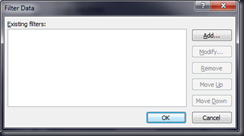
- In specify Filter Conditions, in the first drop-down list choose Select a field or group

Select a Field or Group opened. Select District1 as Data Source, choose City in dataFields then click OK

In specify Filter Conditions, in the last drop-down list choose Select a field or group

Select a Field or Group opened. Select Main as Data Source then choose City in dataFields then click OK

Click on OK to close specify Filter Conditions dialog
- Click on OK to close Filter Data dialog
- Click on OK to close Select a Field or Group
- In Drop Down List box properties, choose d:ID in Value: section then click OK to close this

- In InfoPath Designer, close the Windows then choose the Save and Publish button

- After Publishing complete, back to Ward list then click on Add new item link. You will see the result


Two drop-down list has been cascading.
Sunday, August 8, 2010
Access denied while accessing External content type through External List(BDC)
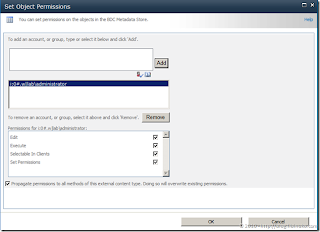
You may encounter “Access denied by Business Data Connectivity” error when trying to access External List. The reason is because External List requires External Content type ; and External Content type is using Business Data Connectivity services proxy to access external Data Source. With the same principle of BDC in MOSS 2007 – users are required to have BDC Object permission before they can use it. There are several set of permission available for the BDC
Edit
- Execute
- Selectable in Clients
- Set Permissions
How to configure the BDC access rights?
1. Open Central Administration page, and click on Manage service application.
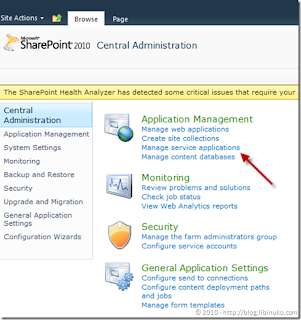
2)2. Click on Business Data Connectivity Service
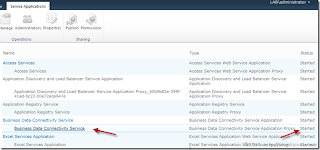
3. Open the context menu of the External Content type (ie. External CT in this example). Click on Set permissions.
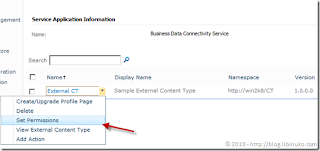
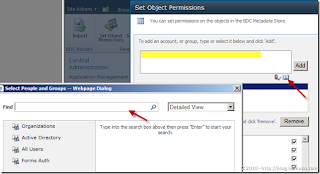
4. Add account (Group, or User) and assign the permissions.
5. Set appropriate permission to the BDC object. Remember that BDC object permission rules the interaction between user and external data source through BDC object. It doesn’t rules his/her permission accessing Forms in the list (New / Edit / Delete form).
Edit
- Execute
- Selectable in Clients
- Set Permissions
How to configure the BDC access rights?
1. Open Central Administration page, and click on Manage service application.

2)2. Click on Business Data Connectivity Service

3. Open the context menu of the External Content type (ie. External CT in this example). Click on Set permissions.

4. Add account (Group, or User) and assign the permissions.

5. Set appropriate permission to the BDC object. Remember that BDC object permission rules the interaction between user and external data source through BDC object. It doesn’t rules his/her permission accessing Forms in the list (New / Edit / Delete form).

Error occured in deployment step 'Add Solution': Property 'SiteUrl' contains an invalid URL
http://weblogs.asp.net/jan/archive/2010/05/07/sharepoint-2010-bdc-model-deployment-issue-the-default-web-application-could-not-be-determined.aspx
Create a new Business Data Connectivity Model project in Visual Studio 2010 and (optionally) implement all your code, change the model etc. When you try to deploy you get the error mentioned above.
To fix it, in the Solution Explorer, navigate to and open the Feature1.Template.xml file (the name could be different if you decided to give your feature a different name of course).

Add the following XML in the Feature element that’s already there (replace the Value with the URL of your site of course):

The resulting XML should look like:

Deploy the solution, now without any issues. :-)
Create a new Business Data Connectivity Model project in Visual Studio 2010 and (optionally) implement all your code, change the model etc. When you try to deploy you get the error mentioned above.
To fix it, in the Solution Explorer, navigate to and open the Feature1.Template.xml file (the name could be different if you decided to give your feature a different name of course).

Add the following XML in the Feature element that’s already there (replace the Value with the URL of your site of course):

The resulting XML should look like:

Deploy the solution, now without any issues. :-)
Tuesday, July 20, 2010
SharePoint 2007 Versus 2010 Comparision
SharePoint went through a major overhaul in capabiltiy, ease of use, ease of administration, and ease of integration. This comparison of SharePoint 2010 version SharePoint 2007 is for those most familiar with the 2007 version.
Complete Feature List for Comparison
User Interface Changes,
List Changes,
Content Management Changes,
Software Development Changes,
Functional Changes,
Backup/Recover/Upgrade Changes,
Web Services Changes,
Site Changes,
Search Changes,
Database Changes,
Architecture Changes,
New Databases,
SharePoint Configuration
Database Changes
User Interface Changes Customers familiar with the previous version of SharePoint will notice some major changes to the user interface in SharePoint 2010.

The new changes are:
1. Ribbon UI – all managements and changes are done via the new Rubbon UI interface that we know by Office 2007 that is called Fluent UI now. This user interface concept has been adopted by SharePoint 2010 to provide a seamless, familiar and responsive user experience across the entire Office suite
2. Multilingual UI – SharePoint 2010 provides different localization of the interfaces. Compating to SharePoint 2007 when you can localize only content, SharePoint 2010 provides you multilingual support for Ribbon, menus and site navigation. Moreover, site owners can configure fields within lists to support multiple languages.
3. Compliance and Accessibility – app pages are XHTML, WCAG 2.0 AA complaint. Unfortunately, SharePoint still categorize browsers on two levels. - Level 1 and 2 browser support. Level 1 browsers are: IE7, IE8, FF – all 32bit browsers where 100% of functionality is guarantee; Level 2 browsers are IE7-IE8 x64, Safari, FF on other platforms, with some limitations in rendering and behaviour. IE6 is not supported
4. Validation of List and Libraries – each item in a list or library now supports item-level and list-level validation. For instance, a list owner can configure a validation to disallow the start date of an event item, stored in one column, to be after the end date of the event, stored in another column
5. Office Web Services - SharePoint 2010 features rich out of the box integration with Web versions of the most popular Office client applications so people can access documents, spreadsheets, presentations and notes without worrying the machine they are on has the latest Office client installed
6. Old Look and Feel - the stadard 2007 theme is supported, and is defaul when you perform migration from SharePoint 2007
7. [new] Themes no longer exist in Windows SharePoint Services "14" and Microsoft SharePoint Server 2010, so any customizations and design work that you have done with themes will not be imported into the new interface
8. [new] Two way of UI changes – customization of UX or simple via API that become possible with SharePoint 2010
9. [new] Office Web Services is a replacement for the Office client and installing on the top of SharePoint 2010 to provide all functionality of the Office 2010 over the Web, thus allowing users to collaborate and edit documents interactively together.
10. [new] 10 New and 4 removed Templates - the following templates have been added to SharePoint 2010: GroupBoard, Visio Process, Bugs, Charitable Contributions, Projects, Enterprise Seach Center, Basic Search Center, FAST Search Center, Enterprise Wike . The next ones have been removed: Site Directory, Search Center with Tabs, Search Center, Collaboration Portal
11. [new] Validation of the user’s input into list columns (formula based)
12. [new] Configuration Wizards in Central Administration simplify the most popular command actions, for example – Farm Configuration Wizard
Customers familiar with the previous version of SharePoint will notice some major changes to the user interface in SharePoint 2010. The new changes are:
List Changes
SharePoint 2010 introduces the following changes to the List:
• List items now display in a screen overlay pop-up.
• New events - WebAdding, WebProvisioning, ListAdding, ListAdded, ListDeleting, ListDeleted
• Site Collection events
• Synchronous "after" events to perform post-processing
• Custom error pages
• New property PSEventPropertiesBase to store the user name and token of the person who triggered the effective action
• New integrity constraints based on the lookup
• Projected Fields - fields from the parent which are referenced and displayed in the child list
• Lists Join - via LINQ, CAML, SharePoint Designer and API (SPQuery.Join and SPQuery.ProjectedFileds)
• Max 50M items under the read scenario
• List query size threshold - return warning or exception of query result exceeds threshold number of records
• Threshold pre-set is 5000 items for the normal user and 20000 items for the Super User
• List Administrators are notified when lists exceed threshold
• List constraints - max 8kb of data per list item (excluding attachments), 6 projected fields on joins (except using the view fields)
• Columns can be flagged as UNIQUE (must be indexed)
• Columns can be validated using custom field or by other fields
Content Management Changes
SharePoint 2010 contains a robust list of rich features that brings ECM to more people within an organization. Most notably is the fact that many records management capabilities in the previous version of SharePoint that were locked to specific site templates are now encapsulated in Features enabling their use in any SharePoint site.
1. Managed Metadata – The ability to centrally define taxonomies that can be leveraged within and across farms to classify and find content quickly.
2. Unique Document IDs – The ability to assign a document a unique identification number people can use to retrieve the document later even if it is moved
3. Document Sets – The capability to group multiple work items into one consolidated atomic work product. Document Set share the same metadata and the entire Document Set can be versioned as a whole and downloaded as a compressed ZIP file with all the contents. Each Document Set has a Welcome Page which displays the metadata shared across all documents in the set as well as a list of all documents. People can customize the Document Set Welcome Page as any other Web Part Page to meet the current business requirements

4. Advanced Routing – The ability people to submit documents to SharePoint sites and let the system determine which library and/or folder it should be saved to using the document's metadata and other rules.
5. In-Place Records Management – The capability that enables a document to be flagged as an official file or record, thus prohibiting any future changes, within collaboration sites. These official records can reside within the same document libraries that contain other documents people are collaborating on.
6. Web Content Management – The capability to host a content-centric site consumable by people with minimal or no collaboration complete with a robust publishing workflow ensuring only the privileged people have permissions to add and edit content on the site.
7. Searching by metadata tags - for content based on metadata breaks down the boundaries of folders, lists and document libraries, sites and site collections.
8. Metadata is extracted from images - metadata is by automatically extracting and promoting metadata from images uploaded to the central Asset Library. This includes details such as EXIF data and other details stored with images. This metadata can be used by people in search queries or when browsing the Asset Library using specific criteria
9. Auto Metadata Tagging - folders within lists and libraries can be configured to automatically tag content with specific metadata such as adding a "year=2010" tag to all documents within the "2010" folder.
10. Content Rating - people vote for which content is more helpful than others. SharePoint 2010 includes a content rating capability that can be leveraged in search queries or custom search solutions to find the most popular content as defined by the people in the organization
11. Content Organizer feature you can define a set of rules and have SharePoint route the documents automatically (like it happened for records management, but now for all documents).
12. Content types sharing – content types can be shared across sites, web applications and farms
13. External Content is supported via External List of SharePoint 2010 and External Columns (you can use existing list + attach the external content)
14. Social data in User Profiles - In Microsoft SharePoint Server 2010, user profile service facilitates a user applying social data on a URI. This is happening via Web services protocol [MS-UPSSDSP] that attaches social metadata to the corresponding URI. A user can select, for example, a document or an arbitrary URL and attach additional social metadata to the URL. Some common scenarios for using metadata include:
o The ability to “rate” a document or content or person
o Add a note or comment to content
o The ability to bookmark content with some pre-defined keywords, such as “a favorite”
o Add tags to the content, to categorize content or highlight with colleagues In case of bookmarks and tags, user profile service works with the Content Management Service to store the value of the tag, and the user profile service database only stores the corresponding GUID.
o For all forms of metadata, four key pieces of information are stored in the user profile service database
15. who added the metadata – that is the record identifier of the user in the profile store
16. when was it added – that is a timestamp
17. where it was applied – that is the URI
18. what social metadata it is – for rating it?s a number ranging from 1-5, for note its the text of the note, and for tags and bookmarks, its the GUID returned from the Content Management Service.
19. Sets - SharePoint Server 2010 drives "Vocabulary" by term sets stored and managed by the term store defined in the Content Management Service. This allows a term set administrator to define centrally controlled terms with full benefit of other functionality implemented by the Content Management Service.
20. Multi-user Collaboration environment - provides multiple users with the ability to edit any workbook simultaneously. (When user is active, the polling rate is determined by an adaptive algorithm executed on the ECS. All edits are processed in the order in which they are received by the ECS so the last edit overwrites any previous edit to the same workbook cell)
21. Content Type Hub , which is a single site collection to store content types, driven by Managed Metadata Service Application. Any web application can subscribe to this service application and thus use the content types and columns defined by the hub
22. Collaboration site should be in the separate Web Applicaiton and Content DB
23. All site collections for a single site subscription must reside on the same farm , but can be spread across Web applications.
24. Can show all lookup columns in parent list .
25. Hierarchical taxonomy across the entire Farm
26. Folder level granularity of complience
27. Send documents to multiple Record Management Centrers via ".Send To" menu
28. Retention policy per content type, libraries and folders
Software Development Changes
1. Upgradable features – can be easily upgrade via code and API available to query features
2. Sandbox isolation – you can deploy features to site collections in “Sandbox” mode, and solution won’t affect other sites. You can deploy a Web Part to a SharePoint site and have it run in the context of that site either in an on-premises instance of SharePoint or in the cloud using the hosted version of SharePoint. The limitation is by site collection scope.
3. Customizable upload page – you can use “CustomUploadPage” class to create your own _layouts\upload.aspx
4. New types by namespace in Microsoft SharePoint Server "14 (add picture)
5. The new Microsoft.SharePoint.Linq namespace , which defines a LINQ to SharePoint provider that translates LINQ queries into Collaborative Application Markup Language
6. Standardized Windows SharePoint Package (WSP) package .
7. The Client Object Model enables to access SharePoint objects through a referenced DLL as opposed to Web service calls
8. Save site as WSP – is helpful for prototyping
9. You should recompile custom code written for Office SharePoint Server 2007 if your solution includes a feature receiver that implements FeatureInstalled, FeatureUninstalling, FeatureActivated, and FeatureDeactivating
10. Microsoft SharePoint Server 2010 contains more than 1,500 deprecated types , most in the Microsoft.SharePoint.Portal
11. User Code Execution Service - Microsoft SharePoint Server 2010 implements a capability to securely host custom solutions and executable code that comes from customers of the system. It provides better controls for the security of execution of custom code, as well as mechanisms to monitor and control the usage of resources by that code.
One requirement of these mechanisms is to move the execution of the code to separate processes and separate servers, to provide better layers of isolation and monitoring. Therefore, two roles are defined in a user code execution process: a front-end Web server which initiates requests to run user code on behalf of a user, and a code execution back end service which fulfills the execution request. Communication between these servers is specified via the User Code Execution Protocol specification ([MS-SPPTC]).
12. Thee object models - managet .NET API, Silverlight Object Model, JavaScript & ECMAScript library
Functional Changes
1. No SSP – the new model of Serviced Applications replace the deprecate SSP in SharePoint 2010. The Service application architecture allows a set of services to be associated with a given Web application and a different set of services to be associated with another Web application (By publishing a service application, it can be shared across server farms)
2. The BCS is actually a platform that provides a SharePoint-based framework for creating Office Business Applications, or OBAs. BDC Entites became “external content type (ECT) “. Business data can be exposed as Office Word document properties and can be inserted into documents. Users can interact with business data using the familiar Outlook interface, and take the data offline using the new SharePoint Workspace
3. Claims based Identity , a system to describe, trust, and act on the identity of users accessing SharePoint. It is a capability that exists in addition to Windows based Authentication (NTLM/Kerberos). SharePoint Server 2010 Technical Preview implementation of Claims based Identity is standards based. Customers deploying SharePoint Server 2010 Technical Preview, can use any protocol or service that implements these standards to provide Identity to SharePoint. In addition, when applications running on SharePoint need to make external Web service calls, SharePoint will issue a SAML token that identifies the user and application pool identity. For more information on Claims based Identity standards, see [WSTrust], [WS-Security], [WSFederation] and [SAMLToken1.1]
4. Composition Application that allows to connect to external data using SharePoint Designer 2010 to create an external content type. This external data can now be leveraged within the Office clients such as Word or Excel. Custom task panes in Outlook can use this data from external line-of-business applications to augment a person's contact card when selected such as their company's recent orders, etc.
5. User profile service export data back to Active Directory and Lightweight Directory Access Protocol (LDAP). In Microsoft SharePoint Server 2010, a user profile service administrator can define properties that will be exported back to the Active Directory. A popular scenario for the export functionality is to send a user’s picture back to be stored in Active Directory
6. Visio 2010 - you can create workflows in Visio 2010 and export them into SharePoint Designer 2010 to add business logic and additional rules
7. Internal SharePoint Designer
Backup/Recover/Upgrade Changes
1. New upgrade scenarios - SharePoint Server 2010 has several features that have been introduced that allow for upgrade scenarios to occur with little to no outages and at the same time allow for quicker upgrade windows.
The first feature is the use of read-only databases which was made available starting with Office SharePoint Server 2007 service pack 2. SharePoint Server 2010 now recognizes a content database has been made read-only from with-in SQL Server and will trim the UI as if all site collections were marked read-only. This allows users read access to the content while the upgrade takes place.
2. Patching improvements . The patch management UI and patch reporting cmdlet allow for the monitoring of patches throughout the farm. There are also patch status health rules that will alert an administrator to inconsistencies
3. Granular Backup/Restore from Central Administration (not only vis STSADM) – including recovery single document
4. Recover data from unattached content database - you don't need to attach content database backup to the SQL Server to recover data from there
5. Browse the content of a content database that is attached to a SQL server but not associated with SharePoint Server
6. Automatic Failover
7. Workflows are not Imported/Exported - when you export/import your Site WorkFlows won't be included, you need to move them manually
Web Services Changes
SharePoint 2007 Web Services model provided limited functionality to manage SharePoint farm over the web model. The reason of this is that SharePoint 2007 was considered as a stand-alone product, without Web 2.0 features and Cloud services. In nowadays, we are moving to Online services and rich Web Services model is one of the requirements for all products we are using, especially for enterprise wide applications that can be scaled globally.
The release of SharePoint 2010 takes into account Web 2.0 and Cloud trend and exposes all new functionality that is exposed not only via SharePoint API, but via Web Services, WCF model and JSON protocol.
Microsoft direction is to provide you rich web API to expose all stand-alone power of SharePoint over the wire.
SharePoint 2010 Web Services were refactored completely to incorporate all power and flexibility of WCF 4.0 technology. New functionality is provided via Web Service mode, as WCF services and supports JSON protocol for Web 2.0 integration
All services are exposed over the same URL patterns:
- Administrative services: http:// : /_vti_adm/Admin.asmx
- Site services: http:// : / /_vti_bin/ .asmx
Howerver, all new MSS2010 functionality (services) are exposed over additional Web Services, that have new URLS like: http:// : / /Admin.asmx
Changes in existing Web Services
There are few services that were updated to provide additional method.
Lists
The list services provides functionality to work with the List libraries

Sites

The "Sites” Web Service provides new methods to manage SharePoint sites (workspaces). Previously, in SharePoint 2007 you can't create workspaces for the root site via Web Services. But now, SharePoint 2010 extends Web Service model and provides methods to manage Workspaces.
With the new method you can get the Web Application ID, create SharePoint Workspace, export site schema as deployable cab file and delete the Workspace, for example use the following snippet to create new “ws2010changes” Team Site beneath the current site with the anonymous access.
siteService.CreateWeb("ws2010changes", "WS2010Changes", "MSS2010 Web Services changes samples", "STS#0", 1033, true, true, true);
CreateWeb method has the following signature (from autogenerated WS classes)
object[] results = this.Invoke("CreateWeb", new object[] {
url,
title,
description,
templateName,
language,
uniquePermissions,
anonymous,
presence});
Site Data

Webs

Form Services

Excel Services

Official File

Search

User Profile Services

Web Part Pages

Site Changes
SharePoint 2010 Site Changes
1. Role/Rule based Audience Targeting – added rules-based audiences, WSS groups and distribution list membership.
2. Sites are collection of pages - SharePoint 2010 sites became more page-focused rather than a collection a lists. Sites still contain the same list and libraries as previous versions of SharePoint, but the site is now a collection of pages.
3. Pages are optimized for Reading – all WCM pages are optimized for the reading, rather than for the writing, thus performance is increased significantly
4. Status updates and activity feeds of My Sites – SharePoint 2010 changes of My Site enhanced dramatically to be the social networking hub. One of such changes is ability to update your status, similar to Facebook. See the following screenshot

5. Social tagging - assignment of descriptor words or categories to that content. There are two types of tagging, social tagging and expertise tagging. Social tagging refers to content and adds metadata to content to describe what it is, what it contains, or what it does. Expertise tagging is related to a person and describes the person, such as what they do, which projects they work on or what skills they have. Where social tagging of content allows users to organically flex and grow a portal’s information architecture over time, expertise tagging helps build relationships and connections to other people in the organization.
6. Team blogs which allows multiple people to publish blog posts together
7. New Lists - Assets Library (list to share and manage rich media assets such as image, audio and video files) , External List (list whose data source is an Enterprise Entity)
8. Site templates are deprecated in SP2010. But, "Save Site as Template" will create a solution package with a .wsp file name extension
9. [new] Improved performance and management of large lists . List item limitation has been removed – 1 million items for 3 secs. Windows SharePoint Services "14" and Microsoft SharePoint Server 2010 apply a default query threshold of 5,000 items. Any custom code that relies on query result sets that can exceed this maximum will not behave as expected. Queries on lists consisting of more than 5,000 items that include non-indexed fields in their query conditions will also fail, because those queries must scan all rows in a list. You can increase this limit or enable the object model to override it on the Central Administration site (under Application Management, click Manage Web Applications, click General Settings, and then click Resource Throttling
10. Lists support external data , can return results as DataTable; support calculated field rule validation and no more even’t receivers
Search Changes
1. Three ranges of search – Search Server 2010 (Entry Level), OOTB Seach, (Infrastructure), and FAST Search (high-end). FAST will be licensed through our Enterprise CAL (for internal search) with an additional server
2. No more 50 millions items limitation - FAST provides powerful capabilities to index hundred millions items, so no more SharePoint 2007 index limitations
3. Query syntax – can use AND, OR, NOT keywords in search query
4. Wildcard search - using * in search query
5. Faceted search/Refinements – refinements are shown in the panel to filter the results (by tags and metadata). This funtionality is supported in the Standard edition and above
6. New search Web Parts - many search-related Web Parts that enable power users to create customized search experiences that implement automatic filtering, best bets, a refinement panel, featured content or offer pre-defined queries
7. Social people search - phonetic name matching (returns names that sound similar to what the user has typed as a query & all variations of common names, including nicknames); exploring results via name, title, and expertise; include real-time presence through Office Communication Server
8. Social distance - SharePoint builds a model of your regular interactions based on e-mail conversations and group memberships, which it uses to organize people search results based on social distance - a direct colleague will appear before someone 3 degrees removed.
9. Index Partitioning - SharePoint Search supports partitioning the index and having multiple indexers that can be aggregated together
10. Query Partitioning - Each query partition can contain up to ~10 million items, and can also be “cloned” by deploying multiple instances of a given query partition across several query servers. Query throughput increases when you add query partition instances.
11. FAST Search replacement - The new architecture scales up to approximately 500 million items, and search can be utilized in a multi-tenant hosting environment.
12. Crawling Service - Multiple crawlers can be used simultaneously to crawl different content during each crawl cycle. This improves performance and can also provide redundancy. All crawling information is stored into “property database”.
13. Cross-farm search service that allows farms to connect to multiple farms to consume cross-farm data
14. Metadata index is expose via search
15. Search Server doesn't support people search - this functionality is available only in SharePoint 2010 OOTB Search
16. FAST Search services in 2010 means that ingesting structured data from external Line of Business applications is much easier in FAST Search for SharePoint. More details are there
Database Changes
SharePoint 2010 database model has been changed significantly in the way of distributing data across several databases that makes horizontal distribution of SharePoint 2010 solutions very feasible.
There are three areas of changes - architecutre changes, new databases and new tables.
Architecture Changes
SharePoint 2007 stored all content in large tables (for example lists, site collects end etc were represented as a huge table), and the performance were affected by SQL Server locks, especially in the large collaborative projects, when a lot of people use the same content and SQL Server locked the table, so no one can work till person generated the lock release the content (SQL Server 2005 suffered from this very much, because its internal behavior tends to lock table when 2000+ items are selected). I posted several tips, explaining such behavior (see tip #29)
Thus, you were limited with 2000 items in List and should use several Site Collections in case of large collaborative community.
SharePoint 2010 changes solved those issue - moving content from the singe tables into different tables. Such changes allows you to store million items in the lists (yep, we are step close to ECM requirements I blogged earlier) and have very intensive collaborative project in one Site Collection.
100 GB "recommendation" on the Content Database size is not an issue any longer.
New Databases
SharePoint Shared Services became deprecated in SharePoint 2010, and instead we have new Services architecture, where all services are independent from each other. Such architecture affected the way information and configuration are stored and each services has it's own database.
Previously, with SharePoint 2007 we had at least 6 databases for each installation
1. Central Administration - [SharePoint_AdminContent ]
2. Configuration - [SharePoint_Config]
3. SSP - 3 databases for SSP settings, MySites, and Search
4. Web Application - custom database
With SharePoint 2010 model we still have Central Administration and other databases, but instead of point 3 we end up with the separate database for each Service, for example [AccessServices], [MetadataServices], [WebAnalyticsReporting] and etc. So, we can easity have 15 databases only for the simple SharePoint 2010 solution.
[new] User Profiles use 3 databases: [Profiles] - for the actual profile content, [Syncronization] to keep configurations of the extenal data and [Social Tagging] to store tags and noted created by users
SharePoint Configuration Database Changes
There are several changes of the tables in the SharePoint Configuration database. The following tables have been added:
1. AllFileFragments
2. AllListAux
3. AllListPlus
4. AllListUniqueFields
5. AllLookupRelationships
6. AllWebParts (Renamed from WebParts)
7. CustomActions
8. Resources
9. SharedAccessRequest
10. SiteDeletion
11. SolutionResourceUsageDaily
12. SolutionResourceUsageDailyOriginal
13. SolutionResourceUsageLog
14. SolutionResourceUsageLogWindowed
15. Solutions
16. WebsPlus
Removed Tables:
1. Categories
2. Image0x
3. WebCat
Complete Feature List for Comparison
User Interface Changes,
List Changes,
Content Management Changes,
Software Development Changes,
Functional Changes,
Backup/Recover/Upgrade Changes,
Web Services Changes,
Site Changes,
Search Changes,
Database Changes,
Architecture Changes,
New Databases,
SharePoint Configuration
Database Changes
User Interface Changes Customers familiar with the previous version of SharePoint will notice some major changes to the user interface in SharePoint 2010.

The new changes are:
1. Ribbon UI – all managements and changes are done via the new Rubbon UI interface that we know by Office 2007 that is called Fluent UI now. This user interface concept has been adopted by SharePoint 2010 to provide a seamless, familiar and responsive user experience across the entire Office suite
2. Multilingual UI – SharePoint 2010 provides different localization of the interfaces. Compating to SharePoint 2007 when you can localize only content, SharePoint 2010 provides you multilingual support for Ribbon, menus and site navigation. Moreover, site owners can configure fields within lists to support multiple languages.
3. Compliance and Accessibility – app pages are XHTML, WCAG 2.0 AA complaint. Unfortunately, SharePoint still categorize browsers on two levels. - Level 1 and 2 browser support. Level 1 browsers are: IE7, IE8, FF – all 32bit browsers where 100% of functionality is guarantee; Level 2 browsers are IE7-IE8 x64, Safari, FF on other platforms, with some limitations in rendering and behaviour. IE6 is not supported
4. Validation of List and Libraries – each item in a list or library now supports item-level and list-level validation. For instance, a list owner can configure a validation to disallow the start date of an event item, stored in one column, to be after the end date of the event, stored in another column
5. Office Web Services - SharePoint 2010 features rich out of the box integration with Web versions of the most popular Office client applications so people can access documents, spreadsheets, presentations and notes without worrying the machine they are on has the latest Office client installed
6. Old Look and Feel - the stadard 2007 theme is supported, and is defaul when you perform migration from SharePoint 2007
7. [new] Themes no longer exist in Windows SharePoint Services "14" and Microsoft SharePoint Server 2010, so any customizations and design work that you have done with themes will not be imported into the new interface
8. [new] Two way of UI changes – customization of UX or simple via API that become possible with SharePoint 2010
9. [new] Office Web Services is a replacement for the Office client and installing on the top of SharePoint 2010 to provide all functionality of the Office 2010 over the Web, thus allowing users to collaborate and edit documents interactively together.
10. [new] 10 New and 4 removed Templates - the following templates have been added to SharePoint 2010: GroupBoard, Visio Process, Bugs, Charitable Contributions, Projects, Enterprise Seach Center, Basic Search Center, FAST Search Center, Enterprise Wike . The next ones have been removed: Site Directory, Search Center with Tabs, Search Center, Collaboration Portal
11. [new] Validation of the user’s input into list columns (formula based)
12. [new] Configuration Wizards in Central Administration simplify the most popular command actions, for example – Farm Configuration Wizard
Customers familiar with the previous version of SharePoint will notice some major changes to the user interface in SharePoint 2010. The new changes are:
List Changes
SharePoint 2010 introduces the following changes to the List:
• List items now display in a screen overlay pop-up.
• New events - WebAdding, WebProvisioning, ListAdding, ListAdded, ListDeleting, ListDeleted
• Site Collection events
• Synchronous "after" events to perform post-processing
• Custom error pages
• New property PSEventPropertiesBase to store the user name and token of the person who triggered the effective action
• New integrity constraints based on the lookup
• Projected Fields - fields from the parent which are referenced and displayed in the child list
• Lists Join - via LINQ, CAML, SharePoint Designer and API (SPQuery.Join and SPQuery.ProjectedFileds)
• Max 50M items under the read scenario
• List query size threshold - return warning or exception of query result exceeds threshold number of records
• Threshold pre-set is 5000 items for the normal user and 20000 items for the Super User
• List Administrators are notified when lists exceed threshold
• List constraints - max 8kb of data per list item (excluding attachments), 6 projected fields on joins (except using the view fields)
• Columns can be flagged as UNIQUE (must be indexed)
• Columns can be validated using custom field or by other fields
Content Management Changes
SharePoint 2010 contains a robust list of rich features that brings ECM to more people within an organization. Most notably is the fact that many records management capabilities in the previous version of SharePoint that were locked to specific site templates are now encapsulated in Features enabling their use in any SharePoint site.
1. Managed Metadata – The ability to centrally define taxonomies that can be leveraged within and across farms to classify and find content quickly.
2. Unique Document IDs – The ability to assign a document a unique identification number people can use to retrieve the document later even if it is moved
3. Document Sets – The capability to group multiple work items into one consolidated atomic work product. Document Set share the same metadata and the entire Document Set can be versioned as a whole and downloaded as a compressed ZIP file with all the contents. Each Document Set has a Welcome Page which displays the metadata shared across all documents in the set as well as a list of all documents. People can customize the Document Set Welcome Page as any other Web Part Page to meet the current business requirements

4. Advanced Routing – The ability people to submit documents to SharePoint sites and let the system determine which library and/or folder it should be saved to using the document's metadata and other rules.
5. In-Place Records Management – The capability that enables a document to be flagged as an official file or record, thus prohibiting any future changes, within collaboration sites. These official records can reside within the same document libraries that contain other documents people are collaborating on.
6. Web Content Management – The capability to host a content-centric site consumable by people with minimal or no collaboration complete with a robust publishing workflow ensuring only the privileged people have permissions to add and edit content on the site.
7. Searching by metadata tags - for content based on metadata breaks down the boundaries of folders, lists and document libraries, sites and site collections.
8. Metadata is extracted from images - metadata is by automatically extracting and promoting metadata from images uploaded to the central Asset Library. This includes details such as EXIF data and other details stored with images. This metadata can be used by people in search queries or when browsing the Asset Library using specific criteria
9. Auto Metadata Tagging - folders within lists and libraries can be configured to automatically tag content with specific metadata such as adding a "year=2010" tag to all documents within the "2010" folder.
10. Content Rating - people vote for which content is more helpful than others. SharePoint 2010 includes a content rating capability that can be leveraged in search queries or custom search solutions to find the most popular content as defined by the people in the organization
11. Content Organizer feature you can define a set of rules and have SharePoint route the documents automatically (like it happened for records management, but now for all documents).
12. Content types sharing – content types can be shared across sites, web applications and farms
13. External Content is supported via External List of SharePoint 2010 and External Columns (you can use existing list + attach the external content)
14. Social data in User Profiles - In Microsoft SharePoint Server 2010, user profile service facilitates a user applying social data on a URI. This is happening via Web services protocol [MS-UPSSDSP] that attaches social metadata to the corresponding URI. A user can select, for example, a document or an arbitrary URL and attach additional social metadata to the URL. Some common scenarios for using metadata include:
o The ability to “rate” a document or content or person
o Add a note or comment to content
o The ability to bookmark content with some pre-defined keywords, such as “a favorite”
o Add tags to the content, to categorize content or highlight with colleagues In case of bookmarks and tags, user profile service works with the Content Management Service to store the value of the tag, and the user profile service database only stores the corresponding GUID.
o For all forms of metadata, four key pieces of information are stored in the user profile service database
15. who added the metadata – that is the record identifier of the user in the profile store
16. when was it added – that is a timestamp
17. where it was applied – that is the URI
18. what social metadata it is – for rating it?s a number ranging from 1-5, for note its the text of the note, and for tags and bookmarks, its the GUID returned from the Content Management Service.
19. Sets - SharePoint Server 2010 drives "Vocabulary" by term sets stored and managed by the term store defined in the Content Management Service. This allows a term set administrator to define centrally controlled terms with full benefit of other functionality implemented by the Content Management Service.
20. Multi-user Collaboration environment - provides multiple users with the ability to edit any workbook simultaneously. (When user is active, the polling rate is determined by an adaptive algorithm executed on the ECS. All edits are processed in the order in which they are received by the ECS so the last edit overwrites any previous edit to the same workbook cell)
21. Content Type Hub , which is a single site collection to store content types, driven by Managed Metadata Service Application. Any web application can subscribe to this service application and thus use the content types and columns defined by the hub
22. Collaboration site should be in the separate Web Applicaiton and Content DB
23. All site collections for a single site subscription must reside on the same farm , but can be spread across Web applications.
24. Can show all lookup columns in parent list .
25. Hierarchical taxonomy across the entire Farm
26. Folder level granularity of complience
27. Send documents to multiple Record Management Centrers via ".Send To" menu
28. Retention policy per content type, libraries and folders
Software Development Changes
1. Upgradable features – can be easily upgrade via code and API available to query features
2. Sandbox isolation – you can deploy features to site collections in “Sandbox” mode, and solution won’t affect other sites. You can deploy a Web Part to a SharePoint site and have it run in the context of that site either in an on-premises instance of SharePoint or in the cloud using the hosted version of SharePoint. The limitation is by site collection scope.
3. Customizable upload page – you can use “CustomUploadPage” class to create your own _layouts\upload.aspx
4. New types by namespace in Microsoft SharePoint Server "14 (add picture)
5. The new Microsoft.SharePoint.Linq namespace , which defines a LINQ to SharePoint provider that translates LINQ queries into Collaborative Application Markup Language
6. Standardized Windows SharePoint Package (WSP) package .
7. The Client Object Model enables to access SharePoint objects through a referenced DLL as opposed to Web service calls
8. Save site as WSP – is helpful for prototyping
9. You should recompile custom code written for Office SharePoint Server 2007 if your solution includes a feature receiver that implements FeatureInstalled, FeatureUninstalling, FeatureActivated, and FeatureDeactivating
10. Microsoft SharePoint Server 2010 contains more than 1,500 deprecated types , most in the Microsoft.SharePoint.Portal
11. User Code Execution Service - Microsoft SharePoint Server 2010 implements a capability to securely host custom solutions and executable code that comes from customers of the system. It provides better controls for the security of execution of custom code, as well as mechanisms to monitor and control the usage of resources by that code.
One requirement of these mechanisms is to move the execution of the code to separate processes and separate servers, to provide better layers of isolation and monitoring. Therefore, two roles are defined in a user code execution process: a front-end Web server which initiates requests to run user code on behalf of a user, and a code execution back end service which fulfills the execution request. Communication between these servers is specified via the User Code Execution Protocol specification ([MS-SPPTC]).
12. Thee object models - managet .NET API, Silverlight Object Model, JavaScript & ECMAScript library
Functional Changes
1. No SSP – the new model of Serviced Applications replace the deprecate SSP in SharePoint 2010. The Service application architecture allows a set of services to be associated with a given Web application and a different set of services to be associated with another Web application (By publishing a service application, it can be shared across server farms)
2. The BCS is actually a platform that provides a SharePoint-based framework for creating Office Business Applications, or OBAs. BDC Entites became “external content type (ECT) “. Business data can be exposed as Office Word document properties and can be inserted into documents. Users can interact with business data using the familiar Outlook interface, and take the data offline using the new SharePoint Workspace
3. Claims based Identity , a system to describe, trust, and act on the identity of users accessing SharePoint. It is a capability that exists in addition to Windows based Authentication (NTLM/Kerberos). SharePoint Server 2010 Technical Preview implementation of Claims based Identity is standards based. Customers deploying SharePoint Server 2010 Technical Preview, can use any protocol or service that implements these standards to provide Identity to SharePoint. In addition, when applications running on SharePoint need to make external Web service calls, SharePoint will issue a SAML token that identifies the user and application pool identity. For more information on Claims based Identity standards, see [WSTrust], [WS-Security], [WSFederation] and [SAMLToken1.1]
4. Composition Application that allows to connect to external data using SharePoint Designer 2010 to create an external content type. This external data can now be leveraged within the Office clients such as Word or Excel. Custom task panes in Outlook can use this data from external line-of-business applications to augment a person's contact card when selected such as their company's recent orders, etc.
5. User profile service export data back to Active Directory and Lightweight Directory Access Protocol (LDAP). In Microsoft SharePoint Server 2010, a user profile service administrator can define properties that will be exported back to the Active Directory. A popular scenario for the export functionality is to send a user’s picture back to be stored in Active Directory
6. Visio 2010 - you can create workflows in Visio 2010 and export them into SharePoint Designer 2010 to add business logic and additional rules
7. Internal SharePoint Designer
Backup/Recover/Upgrade Changes
1. New upgrade scenarios - SharePoint Server 2010 has several features that have been introduced that allow for upgrade scenarios to occur with little to no outages and at the same time allow for quicker upgrade windows.
The first feature is the use of read-only databases which was made available starting with Office SharePoint Server 2007 service pack 2. SharePoint Server 2010 now recognizes a content database has been made read-only from with-in SQL Server and will trim the UI as if all site collections were marked read-only. This allows users read access to the content while the upgrade takes place.
2. Patching improvements . The patch management UI and patch reporting cmdlet allow for the monitoring of patches throughout the farm. There are also patch status health rules that will alert an administrator to inconsistencies
3. Granular Backup/Restore from Central Administration (not only vis STSADM) – including recovery single document
4. Recover data from unattached content database - you don't need to attach content database backup to the SQL Server to recover data from there
5. Browse the content of a content database that is attached to a SQL server but not associated with SharePoint Server
6. Automatic Failover
7. Workflows are not Imported/Exported - when you export/import your Site WorkFlows won't be included, you need to move them manually
Web Services Changes
SharePoint 2007 Web Services model provided limited functionality to manage SharePoint farm over the web model. The reason of this is that SharePoint 2007 was considered as a stand-alone product, without Web 2.0 features and Cloud services. In nowadays, we are moving to Online services and rich Web Services model is one of the requirements for all products we are using, especially for enterprise wide applications that can be scaled globally.
The release of SharePoint 2010 takes into account Web 2.0 and Cloud trend and exposes all new functionality that is exposed not only via SharePoint API, but via Web Services, WCF model and JSON protocol.
Microsoft direction is to provide you rich web API to expose all stand-alone power of SharePoint over the wire.
SharePoint 2010 Web Services were refactored completely to incorporate all power and flexibility of WCF 4.0 technology. New functionality is provided via Web Service mode, as WCF services and supports JSON protocol for Web 2.0 integration
All services are exposed over the same URL patterns:
- Administrative services: http:// : /_vti_adm/Admin.asmx
- Site services: http:// : / /_vti_bin/ .asmx
Howerver, all new MSS2010 functionality (services) are exposed over additional Web Services, that have new URLS like: http:// : / /Admin.asmx
Changes in existing Web Services
There are few services that were updated to provide additional method.
Lists
The list services provides functionality to work with the List libraries

Sites

The "Sites” Web Service provides new methods to manage SharePoint sites (workspaces). Previously, in SharePoint 2007 you can't create workspaces for the root site via Web Services. But now, SharePoint 2010 extends Web Service model and provides methods to manage Workspaces.
With the new method you can get the Web Application ID, create SharePoint Workspace, export site schema as deployable cab file and delete the Workspace, for example use the following snippet to create new “ws2010changes” Team Site beneath the current site with the anonymous access.
siteService.CreateWeb("ws2010changes", "WS2010Changes", "MSS2010 Web Services changes samples", "STS#0", 1033, true, true, true);
CreateWeb method has the following signature (from autogenerated WS classes)
object[] results = this.Invoke("CreateWeb", new object[] {
url,
title,
description,
templateName,
language,
uniquePermissions,
anonymous,
presence});
Site Data

Webs

Form Services

Excel Services

Official File

Search

User Profile Services

Web Part Pages

Site Changes
SharePoint 2010 Site Changes
1. Role/Rule based Audience Targeting – added rules-based audiences, WSS groups and distribution list membership.
2. Sites are collection of pages - SharePoint 2010 sites became more page-focused rather than a collection a lists. Sites still contain the same list and libraries as previous versions of SharePoint, but the site is now a collection of pages.
3. Pages are optimized for Reading – all WCM pages are optimized for the reading, rather than for the writing, thus performance is increased significantly
4. Status updates and activity feeds of My Sites – SharePoint 2010 changes of My Site enhanced dramatically to be the social networking hub. One of such changes is ability to update your status, similar to Facebook. See the following screenshot

5. Social tagging - assignment of descriptor words or categories to that content. There are two types of tagging, social tagging and expertise tagging. Social tagging refers to content and adds metadata to content to describe what it is, what it contains, or what it does. Expertise tagging is related to a person and describes the person, such as what they do, which projects they work on or what skills they have. Where social tagging of content allows users to organically flex and grow a portal’s information architecture over time, expertise tagging helps build relationships and connections to other people in the organization.
6. Team blogs which allows multiple people to publish blog posts together
7. New Lists - Assets Library (list to share and manage rich media assets such as image, audio and video files) , External List (list whose data source is an Enterprise Entity)
8. Site templates are deprecated in SP2010. But, "Save Site as Template" will create a solution package with a .wsp file name extension
9. [new] Improved performance and management of large lists . List item limitation has been removed – 1 million items for 3 secs. Windows SharePoint Services "14" and Microsoft SharePoint Server 2010 apply a default query threshold of 5,000 items. Any custom code that relies on query result sets that can exceed this maximum will not behave as expected. Queries on lists consisting of more than 5,000 items that include non-indexed fields in their query conditions will also fail, because those queries must scan all rows in a list. You can increase this limit or enable the object model to override it on the Central Administration site (under Application Management, click Manage Web Applications, click General Settings, and then click Resource Throttling
10. Lists support external data , can return results as DataTable; support calculated field rule validation and no more even’t receivers
Search Changes
1. Three ranges of search – Search Server 2010 (Entry Level), OOTB Seach, (Infrastructure), and FAST Search (high-end). FAST will be licensed through our Enterprise CAL (for internal search) with an additional server
2. No more 50 millions items limitation - FAST provides powerful capabilities to index hundred millions items, so no more SharePoint 2007 index limitations
3. Query syntax – can use AND, OR, NOT keywords in search query
4. Wildcard search - using * in search query
5. Faceted search/Refinements – refinements are shown in the panel to filter the results (by tags and metadata). This funtionality is supported in the Standard edition and above
6. New search Web Parts - many search-related Web Parts that enable power users to create customized search experiences that implement automatic filtering, best bets, a refinement panel, featured content or offer pre-defined queries
7. Social people search - phonetic name matching (returns names that sound similar to what the user has typed as a query & all variations of common names, including nicknames); exploring results via name, title, and expertise; include real-time presence through Office Communication Server
8. Social distance - SharePoint builds a model of your regular interactions based on e-mail conversations and group memberships, which it uses to organize people search results based on social distance - a direct colleague will appear before someone 3 degrees removed.
9. Index Partitioning - SharePoint Search supports partitioning the index and having multiple indexers that can be aggregated together
10. Query Partitioning - Each query partition can contain up to ~10 million items, and can also be “cloned” by deploying multiple instances of a given query partition across several query servers. Query throughput increases when you add query partition instances.
11. FAST Search replacement - The new architecture scales up to approximately 500 million items, and search can be utilized in a multi-tenant hosting environment.
12. Crawling Service - Multiple crawlers can be used simultaneously to crawl different content during each crawl cycle. This improves performance and can also provide redundancy. All crawling information is stored into “property database”.
13. Cross-farm search service that allows farms to connect to multiple farms to consume cross-farm data
14. Metadata index is expose via search
15. Search Server doesn't support people search - this functionality is available only in SharePoint 2010 OOTB Search
16. FAST Search services in 2010 means that ingesting structured data from external Line of Business applications is much easier in FAST Search for SharePoint. More details are there
Database Changes
SharePoint 2010 database model has been changed significantly in the way of distributing data across several databases that makes horizontal distribution of SharePoint 2010 solutions very feasible.
There are three areas of changes - architecutre changes, new databases and new tables.
Architecture Changes
SharePoint 2007 stored all content in large tables (for example lists, site collects end etc were represented as a huge table), and the performance were affected by SQL Server locks, especially in the large collaborative projects, when a lot of people use the same content and SQL Server locked the table, so no one can work till person generated the lock release the content (SQL Server 2005 suffered from this very much, because its internal behavior tends to lock table when 2000+ items are selected). I posted several tips, explaining such behavior (see tip #29)
Thus, you were limited with 2000 items in List and should use several Site Collections in case of large collaborative community.
SharePoint 2010 changes solved those issue - moving content from the singe tables into different tables. Such changes allows you to store million items in the lists (yep, we are step close to ECM requirements I blogged earlier) and have very intensive collaborative project in one Site Collection.
100 GB "recommendation" on the Content Database size is not an issue any longer.
New Databases
SharePoint Shared Services became deprecated in SharePoint 2010, and instead we have new Services architecture, where all services are independent from each other. Such architecture affected the way information and configuration are stored and each services has it's own database.
Previously, with SharePoint 2007 we had at least 6 databases for each installation
1. Central Administration - [SharePoint_AdminContent ]
2. Configuration - [SharePoint_Config]
3. SSP - 3 databases for SSP settings, MySites, and Search
4. Web Application - custom database
With SharePoint 2010 model we still have Central Administration and other databases, but instead of point 3 we end up with the separate database for each Service, for example [AccessServices], [MetadataServices], [WebAnalyticsReporting] and etc. So, we can easity have 15 databases only for the simple SharePoint 2010 solution.
[new] User Profiles use 3 databases: [Profiles] - for the actual profile content, [Syncronization] to keep configurations of the extenal data and [Social Tagging] to store tags and noted created by users
SharePoint Configuration Database Changes
There are several changes of the tables in the SharePoint Configuration database. The following tables have been added:
1. AllFileFragments
2. AllListAux
3. AllListPlus
4. AllListUniqueFields
5. AllLookupRelationships
6. AllWebParts (Renamed from WebParts)
7. CustomActions
8. Resources
9. SharedAccessRequest
10. SiteDeletion
11. SolutionResourceUsageDaily
12. SolutionResourceUsageDailyOriginal
13. SolutionResourceUsageLog
14. SolutionResourceUsageLogWindowed
15. Solutions
16. WebsPlus
Removed Tables:
1. Categories
2. Image0x
3. WebCat
Subscribe to:
Comments (Atom)
Content Editor Webpart not showing up in SharePoint Online ------------------------------------------------------------------------------...
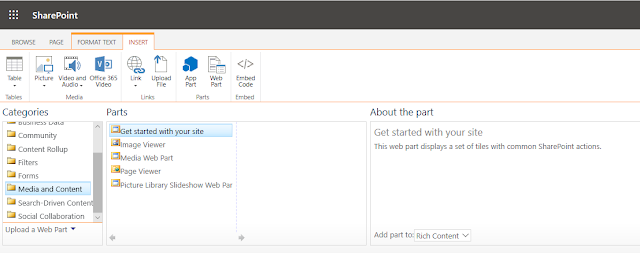
-
 Content Editor Webpart not showing up in SharePoint Online ------------------------------------------------------------------------------...
 -
 Ribbon missing in Share point online Pages to add custom web part : --------------------------------------------------------------------...
 -
Sharepoint Online Management Shell ------------------------------------------------------------------------------------------------------...